
Advance Your Career with Professional Associations

Photo by Mikhail Nilov on Pexels.com

Professional associations are excellent opportunities for administrative and executive assistants to network and build skillsets. They help develop professional growth through in-person events, continuing education, and job discussion boards.

Who They Are: The American Society of Administrative Professionals (ASAP) mission is to provide education, training, and resources for administrative professionals and executive assistants worldwide to help them navigate and succeed in the ever-changing business world. One of the association’s core values is the belief in diversity, equity, and inclusion (DEI). ASAP believes that with DEI, their communities are richer, stronger, and more dynamic. To demonstrate their commitment to DEI, the ASAP website has links to a knowledge base devoted to the concept.

What They Do: ASAP provides training resource for such skills as communication, efficiency, leadership, technology, as well as other professional development sources. They also provide 1-hour webinars on such topics as “Strategic Thinking for Results—Skills for Competent Critical Thinking,” “Resilient Leadership for Today’s Assistant,” and “The Global Skills Matrix.”

In addition to training resources and webinars, the ASAP provides a Professional Administrative Certificate of Excellence (PACE) course, which expands on the in-demand skills needed by today’s admins.


Membership Benefits: ASAP provides a free membership, as well as a paid all-access membership. Both provide access to reference materials, articles, and a job board, as well as discounts on webinars, conferences, technology, company travel, and education. The paid membership provides full access to the association’s extensive library of webinars and educational bundles.

Who They Are: The Association of Executive and Administrative Professionals (AEAP) members include administrative assistants, executive secretaries, executive assistants, legal assistants, office managers, and other administrative professionals. The association’s goals are to promote the professional development of members as well as increase and improve the benefits available to those members.

What They Do: AEAP offers an extensive catalog of continuing education certificates and courses, including such career-building topics as “Data Analytics,” “LEED Green Building,” “Six Sigma and Lean,” and “Sustainable Management,” as well as courses designed to promote personal enrichment.

Membership Benefits: There are two primary levels of membership, basic and premium. Both provide full access to the AEAP website, plus education resources, a networking forum, subscription to a newsletter, and a job board. The premium membership also offers a roadside assistance plan, prescription drug discount, as well as savings on travel.

Who They Are: The Executive Assistants Organization (EAO) is an international association that exists specifically for executive assistants. While this role is important to the development of businesses, entrepreneurs, and executives, there is no college curriculum path for these individuals. EAO’s goal, therefore, is to help every executive assistant reach their potential through continued education, exclusive events, peer networking, mentors, and lessons in leadership.

What They Do: EAO offers continuing education webinars, podcasts, and in-person events to keep executive assistants current on in-demand technologies and skills. The EAO can also create customized training seminars, focus groups, or one-on-one teachings for entire organizations. Peer networking and mentoring is available to support and educate through local chapters and events, as well as through online services. The organization also sponsors retreats for members to socialize and network with like-minded individuals.


Membership Benefits: Monthly and annual memberships are available. Membership includes full access to the EAO website, educational resources, online conference footage, community forums, mentorship, conferences, retreats, as well as a job board.

Who They Are: The International Association of Administrative Professionals (IAAP)

combines its core values such as authenticity, passion, and relevance with its aspirational values such as advocacy, inclusion and diversity, and transparency, to create an environment conducive to assisting administrative professionals in advancing their careers. The association also promotes a strong community of individuals with shared goals, responsibilities, challenges, opportunities, and strengths.

What They Do: IAAP offers a wide range of continuing education resources, as well as certified administrative professional (CAP) certification. In addition, it offers in-depth courses in areas such as organizational management, business writing, project management, and event planning. Additional learning opportunities are available through leadership training and an annual conference.

Membership Benefits: IAAP offers a professional membership as well as a student membership for those enrolled in a degree-granting program. A free 30-day trial membership is also available, which gives full access to the website. All memberships include online learning opportunities, networking conferences and events, as well as a job board.

Who They Are: The National Association of Presidential Assistants in Higher Education (NAPAHE) is an international organization for presidential assistants (PAs) and other professionals who support leaders in higher education. It offers educational programs and information resources for like-minded individuals, organizations, and institutions. By sharing professional experiences and ideas, the association fosters growth in its members and their communities.

What They Do: The NAPAHE website provides useful tools for PAs, such as information about links to national and federal associations, federal and legislative issues affecting education, and much more. There are also networking opportunities, discussion boards, and webinars, as well as an annual conference.

Membership Benefits: Various membership levels are available based on organization size. Individual memberships are also available. Members have full access to all resources on the NAPAHE website, as well as educational opportunities to expand knowledge in areas such as higher education issues, speech writing, fundraising, event management, and more.

Who They Are: The National Association of Professional Receptionists (NAPR) provides representation, education, and accreditation for receptionists, switchboard operators, information clerks, greeters, administrative professionals, and customer service representatives. The association’s goal is to promote the value in these necessary support positions, set standards for professionalism, and give its members a voice in management.

What They Do: The association provides career guidance to members who wish to receive their Certified Professional Receptionist (CPR) certificate. The NAPR also offers training and personal development seminars, a discussion board, networking events and conferences, and an informative newsletter.

Membership Benefits: Individual membership is available, as well as corporate memberships. Members get full access to the NAPR website, leadership opportunities, educational opportunities, and job placement and career change assistance.

Portions of this article originally appeared on the Quill.com website

The Sundance Company                                                              
Established in 1976, The Sundance Company has the experience to help you with your commercial real estate needs throughout the Boise Valley. If your requirements include property management, leasing, real estate development, project planning, construction or space planning then look to us. The Sundance Company has more than 1.6 million square feet of office and industrial space available in prime locations in the Boise metropolitan area. More information is available at www.sundanceco.com or 208.322.7300.


Which French Fries Are The Best?

The Sundance Company                                                              
Established in 1976, The Sundance Company has the experience to help you with your commercial real estate needs throughout the Boise Valley. If your requirements include property management, leasing, real estate development, project planning, construction or space planning then look to us. The Sundance Company has more than 1.6 million square feet of office and industrial space available in prime locations in the Boise metropolitan area. More information is available at www.sundanceco.com or 208.322.7300.
Proven Time Management Techniques

The Sundance Company                                                              
Established in 1976, The Sundance Company has the experience to help you with your commercial real estate needs throughout the Boise Valley. If your requirements include property management, leasing, real estate development, project planning, construction or space planning then look to us. The Sundance Company has more than 1.6 million square feet of office and industrial space available in prime locations in the Boise metropolitan area. More information is available at www.sundanceco.com or 208.322.7300.

8 ChatGPT Prompts to Finish Hours of Work in Seconds

Photo by Andrew Neel on Pexels.com

Rowan Cheung is founder of The Rundown, a fast-growing AI newsletter providing an in-depth look at the latest developments in AI. In less than 4 months, The Rundown has gained a following of over 170,000 subscribers who rely on its content to stay informed about the latest advancements in artificial intelligence. Cheung is on a mission to inform millions of people about the latest advancements in AI and highlight how technology is transforming the world. His AI database, Supertools, records the best tools mentioned in the newsletter. Cheung shares eight ChatGPT prompts to finish hours of work in seconds, to supercharge your output without breaking a sweat.

1. Explain like I’m a beginner

Perhaps there’s a concept you haven’t fully grasped, but it’s fundamental to whatever you’re writing or working on. Rather than struggle away trying to wrap your head around what it means, ask ChatGPT to find an explanation that resonates. After using this prompt, your entire project might make more sense, opening a clear picture of the way forward.

Here’s the prompt: “Explain [topic] in simple terms. Explain to me as if I’m a beginner.” What follows should be basic concepts, simple analogies, and memorable ways of demystifying the field.

2. Create unique content ideas

Perhaps you’re right at the beginning of your content creation journey and you need the ideas to get you started, optimized for a certain platform. If you have your topic and you know your audience, ask ChatGPT to come up with ideas of how you can most effectively share, in such a way that the content could go viral. Discard the bad ideas and move forward with the best.

Here’s the prompt, according to Cheung: “Topic: How to [go viral on Twitter, write a viral blog post] talking about [your topic]. Come up with unique and innovative content ideas that are unconventional for this topic for the medium of [Twitter, article, LinkedIn, etc.].”

3. Quiz yourself

So, you’ve been learning a new subject but you’re not sure it’s sticking. In school, you’d learn and revise to pass a test. Now, you can use ChatGPT to create that test. Ask for a quiz to test your existing knowledge on a topic, to figure out your gaps and how much is left to learn. Or ask for a quiz about a topic you know nothing about, perhaps before you begin a project on that topic, to set the scene and motivate you to conquer it.

Cheung recommends using this very simple prompt: “Give me a short quiz that tests me on [what you want to learn]” and be sure to fact-check, because the program has been known to deviate from the facts.

4. Change the writing style or tone

Imagine you wrote something in a bad mood and now it shows in the tone. Or you sent a bio in first person, and someone wants it in third. Whatever you have made can be transformed with this prompt, saving you the time of doing it manually.

The prompt: “Change the writing style of the text below to [style or tone]” then paste the text, hit return and see the new version. If you need further edits, ask for them too.

5. Consult an expert

When you know there’s room for improvement in what you have written, get ChatGPT to be your trusted editor. Whether you want it to play the part of a lawyer, subject matter expert or simply a proofreader, ask for commentary from that point of view.

Cheung prompts ChatGPT in the following way: “I will give you a sample of my writing. I want you to criticize it as if you were [role]” Then add your writing, submit to ChatGPT and brace for its critique. Take the parts you agree with and ask it to rewrite the text with them in mind.

6. Train it to learn your writing

Not only can you train ChatGPT to learn your writing style, you can train it to create its own prompt to write in your style. And who better to create prompts for ChatGPT than the program itself? It will be instructing itself in its own preferred way of learning, a self-guiding method that brings you the best results.

The prompt is simple: “Analyze the text below for style, voice, and tone. Create a prompt to write a new paragraph in the same style, voice, and tone.” After adding your text, what follows will be the prompt that you can paste into future instructions to write in your style.

7. Specify the audience and purpose

Let’s imagine you’ve asked ChatGPT to write some articles on a certain topic, but it’s missing the mark. Or imagine you’ve written the content yourself, but you know it could be better. Here’s where more specific prompting can bring forth more detailed work, that resonates far better with your audience.

Within this prompt, specify the audience, tone, and goal. Cheung’s example on an article with, “Topic: How to grow your Twitter following,” was to add, “Audience: Twitter users trying to grow their account. Tone: Inspiring Goal: Inspire audience to feel excited about growing their Twitter following and teach them how to do it in simple terms.” Now, the text will be reworked to fulfill that goal, without any further input from you.

8. List long articles in bullet points

Much of the content on the internet is simply curation. Academics and philosophers did the research and the thinking, and the rest of us are turning those vast studies into bite-sized nuggets that our audiences can consume. As with most tasks of this nature, there’s a prompt for that.

This prompt for ChatGPT, according to Cheung, is to: “Summarize this paragraph into bullet points that a beginner would understand.” You then copy a paragraph or more from any given text and see a summary. This summary might be used as a social media post, a LinkedIn carousel, or simply used to help you paraphrase in a way that suits your style and medium.

Don’t get stuck with writer’s block, chained to your desk struggling for inspiration to start, keep going or finish. Use these simple prompts to expand your reach, unlock new ideas and create more consistently. Build a habit of co-creating with AI and take steps in the right direction of prolific production.

Portions of this article originally appeared on the Forbes website

The Sundance Company                                                              
Established in 1976, The Sundance Company has the experience to help you with your commercial real estate needs throughout the Boise Valley. If your requirements include property management, leasing, real estate development, project planning, construction or space planning then look to us. The Sundance Company has more than 1.6 million square feet of office and industrial space available in prime locations in the Boise metropolitan area. More information is available at www.sundanceco.com or 208.322.7300.

The Different Types of Sparkling Water

The Sundance Company                                                              
Established in 1976, The Sundance Company has the experience to help you with your commercial real estate needs throughout the Boise Valley. If your requirements include property management, leasing, real estate development, project planning, construction or space planning then look to us. The Sundance Company has more than 1.6 million square feet of office and industrial space available in prime locations in the Boise metropolitan area. More information is available at www.sundanceco.com or 208.322.7300.

Tips to Creating an Outdoor Workspace


Photo by Tirachard Kumtanom on Pexels.com

Read on for tips on designing, installing, and maintaining an outdoor workspace.

Keep An Open Mind

Installing AV technology in an outdoor space may seem daunting to companies—but to AV tech professionals, they’re a fantastic blank canvas. Outdoor areas are open to countless configurations and setups, which means that workplaces will need to keep an open mind as they consider the configurations and the systems themselves. Outdoor spaces provide flexibility to do things differently every time, so don’t get too locked into a setup that limits your options.

In fact, planning with the assumption that an outdoor space will only be used in one specific way will put you at a disadvantage. Take a rooftop, for example, you may want to use this for open-air working during the day, for company events and celebrations in the early evening, and for the occasional mid-morning conference or presentation. Having a single, locked-in setup won’t categorically prevent all these uses, but it will absolutely favor some while making others much harder.

Leaving the rooftop open to different configurations will make a world of difference, even by making such simple switches as changing which direction is the “front” depending on the time of day to avoid the sun’s glare. This can be quite difficult if your space is set up in a single configuration, so be sure to consult the experts to plan a truly multi-use outdoor workspace.

Plan For Everything

Nothing kills an outdoor event like bad weather, so be sure to have plans and systems in place that will mitigate or avoid the effects of nature. Remember that rooftop space that can be used for morning events. Not only do you need to account for the sun on the screen—you also need to have a plan in place to ensure that the presenter won’t be squinting with the sun in their eyes.

That could mean turning the entire configuration sideways or perhaps designing the space itself to have a modular roof structure that shields certain areas from the sun. The latter point is exactly why your AV partner should be involved in the design phase of any outdoor space: based on your plans, they’ll be able to tell you where that roof may need to be placed, or if it’s necessary at all.

From an acoustic standpoint, it’s essential to plan for wind and environmental noises such as road traffic. Spaces that simply need some music can benefit from the low-profile, ground-level speakers that are also popular in residential settings. For outdoor spaces geared toward events, standard conference-room speakers that would traditionally be suspended from the ceiling won’t cut it. Instead, look for wall-mounted systems that can direct sound across an area instead of down into that space.

Weatherproof, Always

It won’t come as a surprise that outdoor AV technology is built differently from indoor, as the former systems need to be weather-resistant. There is a myriad of options in the world of outdoor AV tech, however, so it’s important to let the specifics of your outdoor space lead your choice of tech.

What makes any given TV, speaker, or lighting unit capable of withstanding the weather? For starters, covering all the connector points. An all-weather speaker or TV is sealed up in such a way that water can’t sleep in and reach electrical components. For something like all-weather lights, this means that rubber fittings are added to every connector, ensuring that everything is sealed up and adequately covered.

This doesn’t mean that you must buy all-new equipment: manufacturers make “enclosures” that will weatherproof your existing TV, for example, if you don’t have the budget to buy a brand-new weatherproofed system.

There are different levels of weatherproofing, depending on the level of exposure. If your systems are located under a modular roof, they won’t need the same level of protection as something that’s completely exposed to the elements. They will, however, still need some level of protection from moisture that can seep in from the air.

It all comes down to the cost and availability parameters: although a fully exposed piece of equipment would ideally be fully weatherproofed, that’s not always feasible. Sometimes a regular commercial screen and a weatherproofing enclosure will have to do, whether for cost reasons or because a fully weatherproofed piece of equipment wasn’t immediately available.

Brighter Is Better

Whether or not your outdoor space has a locked-in setup, you’ll need to think differently about screen brightness by picking and installing displays that are made specifically for outdoor use.

Why? Whereas indoor screens are only “competing” with office lights, your outdoor screens need to be bright enough to be seen against the brightest light of all: the sun. Look for high-NIT displays, which are designed for beautiful content display even in direct sunlight.

Projectors are a no-go in outdoor spaces, as it’s nearly impossible to find one bright enough to cut through daylight for a clear visual. Stick with TVs or look for an outdoor video wall for more impressive displays.

Don’t Discount Maintenance

So, you’ve built a beautiful, flexible outdoor workspace. Now it’s time to think long-term because outdoor AV tech systems are anything but “set it and forget it.”

Consider having a designated storage system or rack room in which to house any “loose” components like cables, microphones, amplifiers, or mixers. Even a cabinet or closet will suffice, if it’s protected from the elements and close enough to the outdoor area to encourage easy setup and dismantling.

Portions of this article originally appeared on Facility Executive website.

The Sundance Company                                                              
Established in 1976, The Sundance Company has the experience to help you with your commercial real estate needs throughout the Boise Valley. If your requirements include property management, leasing, real estate development, project planning, construction or space planning then look to us. The Sundance Company has more than 1.6 million square feet of office and industrial space available in prime locations in the Boise metropolitan area. More information is available at www.sundanceco.com or 208.322.7300.

How to Make Every Type of Coffee

The Sundance Company                                                              
Established in 1976, The Sundance Company has the experience to help you with your commercial real estate needs throughout the Boise Valley. If your requirements include property management, leasing, real estate development, project planning, construction or space planning then look to us. The Sundance Company has more than 1.6 million square feet of office and industrial space available in prime locations in the Boise metropolitan area. More information is available at www.sundanceco.com or 208.322.7300.

What are the Best AI Tools for Business?


Photo by ThisIsEngineering on Pexels.com

You probably already use a variety of digital tools to boost your business. But to ensure your company is keeping up with the competition, it’s important to understand the AI tools on the market, what they do, and how they may benefit your business. Once you identify the areas in which your company can use AI assistance, you’ll likely find an option to suit your needs below.

  • ChatGPT: Even if you haven’t kept up on recent advances in AI technology, you’ve probably heard the news of ChatGPT’s launch by OpenAI in November 2022. From content creation to recruiting and customer service, this free, generative dialogue AI application has the potential to be useful in nearly any industry for all kinds of businesses. The basic version is free. Users can pay a monthly fee for the premium version, which offers more consistent access, faster responses, and priority access to new features.
  • Jasper: Another useful option for content creation, Jasper is an intuitive writing tool that can generate all kinds of copy (such as emails, blog posts, social media, and product descriptions) with limited instruction. In addition to suggesting a writing tone (such as “casual”), you can drop your writing samples into Jasper to help it create new content in your personal style. Jasper offers a range of subscription plans based on usage and feature needs. Some people report a steep learning curve, so you may need a bit of time to get up to speed.
  • Grammarly: This online writing assistant offers an AI-powered desktop app to help users quickly compose clear, error-free copy whether they’re working in a document, composing an email, or writing a social media post. It doesn’t only catch grammar and spelling errors but can also make suggestions to ensure content hits the right tone and communicates ideas effectively. The basic assistant is free, and users can opt for a yearly subscription for advanced features such as tone adjustment and plagiarism detection.
  • Lensa AI: This imaging tool incorporates AI art generation, which you may have seen in the form of colorful reimaginings of your friends’ selfies on social media. In addition to using many of the standard editing elements you’d find in other image editing apps, Lensa AI uses compiled online art to give visual content an AI makeover. Users can pay a one-time fee for a specific number of unique avatars or opt for an annual subscription for unlimited avatars. And while those selfies may be the example we’ve seen most frequently, the tool can also edit product or service photos at a near-professional level for a low fee.
  • Xero: This accounting software offers tools for small businesses, accountants, and bookkeepers to automate basic accounting tasks and forecast cash flow. It can capture data (such as bills and receipts) automatically by pairing it with Hubdoc. Xero offers a range of subscription plans depending on your needs.
  • Zendesk: Built to improve the customer service experience, Zendesk is a cloud-based help-desk management solution that allows companies to customize the types of experiences they provide their customers. Features like live chat, a customizable front-end portal, and the ability to integrate with applications like Salesforce and Google Analytics make it a popular pick. Zendesk offers subscription plans that vary in price and features.
  • rasa.io: Using AI for email marketing, rasa.io aggregates, curates, and personalizes your website and blog content to help you send industry-relevant, individualized newsletters to community members or subscribers on your email list. It helps companies grow their customer relationships through increased reader engagement. With three subscription plans, rasa.io can suit businesses with small, medium, or large contact lists.
  • Drift: Through conversational AI, Drift aims to help companies engage in personalized conversations to build trust and grow revenue. The company offers real-time chat, video, voice, and email AI products and boasts use cases in marketing, sales, and service within various industries. Drift offers three subscription plans to suit businesses with varying needs.

Portions of this article originally appeared on Quill website.

The Sundance Company                                                              
Established in 1976, The Sundance Company has the experience to help you with your commercial real estate needs throughout the Boise Valley. If your requirements include property management, leasing, real estate development, project planning, construction or space planning then look to us. The Sundance Company has more than 1.6 million square feet of office and industrial space available in prime locations in the Boise metropolitan area. More information is available at www.sundanceco.com or 208.322.7300.

Workplace Wellness Tips to Reduce Physical Stress

Photo by Ketut Subiyanto on Pexels.com

Without incorporating the right healthy work habits, the day-to-day reality of work can have negative effects on the body, too, including everything from sore muscles and sapped productivity to eye strain and increased anxiety. In fact, research has found that on-the-job stress is more strongly correlated with physical health complaints than any other life stressor.

Use these workplace wellness tips for employees to take care of your body at work and reduce physical stress.

Ergonomic Workstation

Taking care of your body at work starts with having the right ergonomic desk setup. Because office work so often involves repetitive tasks and postures, even slight changes to the way your workstation is configured can make a huge difference in how much stress you place on your body throughout the day.

Follow these healthy workplace tips to make your space more ergonomic and create a physical environment that supports your body at work:

  • For desk workers who spend most of the day sitting, an ergonomic office chair, such as this Tempur-Pedic® task chair, is essential. Choose a chair that supports spinal alignment and sound posture. In addition, set your chair at the right height, ensuring that your feet can lay flat on the floor.
  • Your chair isn’t the only factor in supporting good posture. Avoid slouching and craning your neck by placing your computer monitor atop a stand, stack of books, or small box to keep it at eye level. A good rule of thumb for monitor positioning is to align the top of the screen with your eye line.
  • Support your arms and wrists to avoid straining your back and shoulders. Adjust your chair’s armrests so that your arms are slightly lifted at your shoulders. A wrist rest can bring additional comfort and ergonomics to your workstation setup.
  • At the end of the day, just sitting for too long—even at the most ergonomic desk—can take its physical toll. Consider counteracting the effects of the so-called “sitting disease” by opting for an adjustable workstation. A sit-stand ergonomic solution that allows you to adjust the height of your desk, as needed, between sitting and standing, can reduce discomfort and help you maintain productivity.

Build in Breaks


Even when supported by the best workstation design, the body is simply not meant to withstand very long sessions of stationary desk work, whether it’s done sitting or standing. That’s why it’s critical to take short breaks throughout the day to stretch, hydrate, improve circulation, and help keep stress and strain from building.

Of course, during a busy or productive period, it can be easy to let too much time pass between pauses in your work. Luckily, technology can help remind you to take care of your body as well as your work tasks. Setting recurring notifications in your calendar or on your smartphone’s clock app can provide timely reminders. You can even use fitness trackers to set reminders, too. Similarly, following the Pomodoro technique can incorporate short breaks in a productive rhythm of work while encouraging longer breaks over time.

Rest Your Eyes

Be sure to care for your eyes as well as you do the rest of your body during these breaks. After all, prolonged use of your computer can lead to a range of aggravating eye health complications. Avoid eye strain, dry eyes, and even potential migraines by adhering to the 20-20-20 rule. It’s just about as easy to follow as it is to remember: Simply pause every 20 minutes to look into the distance 20 feet for 20 seconds. In the meantime, take even more strain off your eyes by outfitting your workspace with eye-friendly office lamps and lighting.

Take Your Meetings on the Move

For many office employees, a schedule full of meetings might make it even harder to find the time to get out of the chair—whether it’s at your own desk or in the conference room just down the hall.

However, a slate of meetings doesn’t necessarily need to be incompatible with movement. For instance, you can easily convert your one-on-ones and team check-ins from stale sit-downs to dynamic walking meetings. Even if you don’t head very far, just getting outside for some fresh air can reduce stress and give you yet another opportunity to stretch, away from your desk.

Make the Most of Your Time Outside the Office

When it comes down to it, even the best-structured workstation and schedule won’t necessarily be a cure-all for bodily strain and fatigue. Supporting your well-being and fighting physical (and mental) stress at work will require some effort outside the office as well.

After all, maintaining your physical well-being and reducing stress on your body is a crucial part of achieving a healthy work-life balance. In addition to the healthy workplace tips we’ve covered above, be sure to practice a healthy and balanced overall lifestyle.

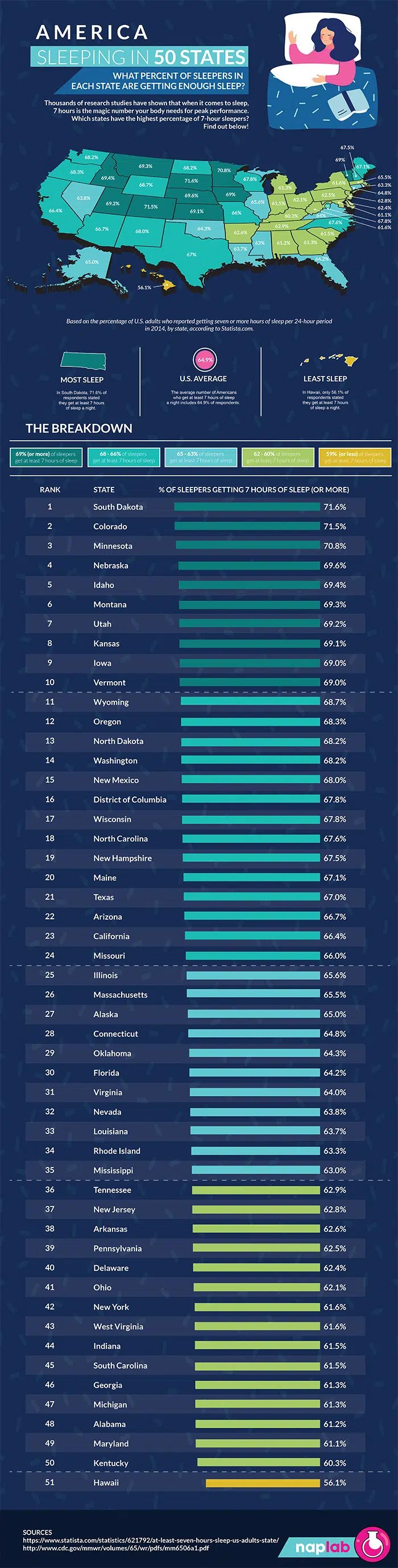
For instance, getting enough sleep each night isn’t just important to have a fresh mind at work. Healthy sleep habits are also closely connected to your physical well-being, helping to regulate stress, improve immune function, repair cells, and maintain cardiovascular health. Meanwhile, regular exercise during the day can improve the quality of your sleep, reduce stress and anxiety, and potentially lower the risk of work-induced strain and injury.

Portions of this article originally appeared on Quill website.


The Sundance Company                                                               
Established in 1976, The Sundance Company has the experience to help you with your commercial real estate needs throughout the Boise Valley. If your requirements include property management, leasing, real estate development, project planning, construction or space planning then look to us. The Sundance Company has more than 1.6 million square feet of office and industrial space available in prime locations in the Boise metropolitan area. More information is available at www.sundanceco.com or 208.322.7300.

The Four Types of Coffee Beans

The Sundance Company                                                              
Established in 1976, The Sundance Company has the experience to help you with your commercial real estate needs throughout the Boise Valley. If your requirements include property management, leasing, real estate development, project planning, construction or space planning then look to us. The Sundance Company has more than 1.6 million square feet of office and industrial space available in prime locations in the Boise metropolitan area. More information is available at www.sundanceco.com or 208.322.7300.